



The Importance of Sharpening Your Battery-Powered Lawn Mower Blades
Sharpening your lawn mower blades doesn’t get as much attention as it should. Neglecting to sharpen your mower blades will result in less efficiency, invite pests and disease into your lawn, and shorten the mower’s lifespan.
It’s essential to keep your lawn mower blades sharp, whether you own a battery-powered or gas-powered mower. This is even more important for battery-powered mowers because blade sharpness improves battery life and prevents the mower from overheating. Keep reading to learn all about Honda lawn mower twin blades and find out just why it’s important to keep lawn mower blades sharp.
Regular mowing keeps a yard looking great, and a sharp blade adds to this in a number of ways. A dull blade doesn’t “cut” a grass blade so much as it “tears” it. This stresses your lawn and can harm its root system. This reduces the lawn’s ability to take up nutrients and water, which causes brown patches.
An improperly cut yard can also be more susceptible to insects like grubs, chinch bugs, and fungal infestations. Your yard needs and deserves a crisp, tidy cut, and the sharp twin blades on your Honda battery-operated mower do precisely that.
Why Blade Sharpness Matters
The sharpness of lawn mower blades affects more than just the cutting action. It can improve lawn health, protect your battery performance, and extend the life of your lawn mower. A dull blade makes the lawn mower work harder, which drains the battery faster. This reduces the mower’s efficiency and could shorten its runtime.
When blades aren’t properly maintained, they can become jagged, which is dangerous as it can increase the risk of injury while cleaning. Dull blades also lead to more clumping, resulting in more bagging, sweeping, and raking on your part.
Improves Lawn Health
Sharp blades make clean and precise cuts that result in a beautiful and well-groomed landscape. This helps grass blades heal faster and reduces the susceptibility to disease and pests.
Protects Battery Performance
Dull blades tear instead of making a sharp and crisp cut. This forces the motor to work harder and drain the battery faster, reducing efficiency and shortening the mower’s runtime.
Better Mowing Results
Cleaner and sharper cuts mean a more even and well-manicured lawn with fewer brown tips or shredded grass ends.
Saves Time and Energy
Sharp blades mean fewer passes over the same area. This reduces the overall mowing time and battery usage.
How to Know When Your Twin Blades Need Attention
Visual Indicators
Along with the appearance of your lawn, there will be visual indications on the blades when your lawn mower’s twin blades need attention. Check it for nicks, dents, and dings along the blade edge. A properly sharpened lawn mower blade should feel sharp, but not have a razor-sharp edge. A razor-sharp edge causes the blade to chip and dull faster. Inspect for visible rust or corrosion spots that may affect performance.
Performance Indicators
Performance plays a role in knowing when your lawn mower twin blades need attention. Do the grass blades look frayed, shredded, or torn after mowing? Are there white, brown, or yellow tinges along the top of the grass? The lawn may also have an uneven height or small patches of uncut grass. These are all indicators that it’s time to sharpen the blades.
Frequency Recommendations
To achieve the best results, inspect the twin blades before every mowing. Consider sharpening more often if you’re mowing over sandy, rocky, or thick and weedy terrain.
How to Inspect and Remove the Twin Blades Safely
Safety is the first step and your biggest priority when inspecting and removing the blades, whether for sharpening, cleaning, or replacing.
Tools Needed
- Socket wrench or ratchet with the appropriate socket size
- Blade removal tool (optional but helpful)
- A brush or rag for scraping debris.
Safety First
Wear heavy gloves and eye protection to go about a lawn mower blade inspection or removal. Always remove the battery before working on a battery-powered mower. Ensure the use of thick gloves while loosening and tightening the blade bolts on a mower.
Removal Basics
Before removing the twin blades, disconnect the spark plug (for gas models) or the battery (for electric models). Tip the mower on its side with the fuel cap side up for gas mowers. Use a socket wrench to loosen bolts, and note the blade orientation for replacement.
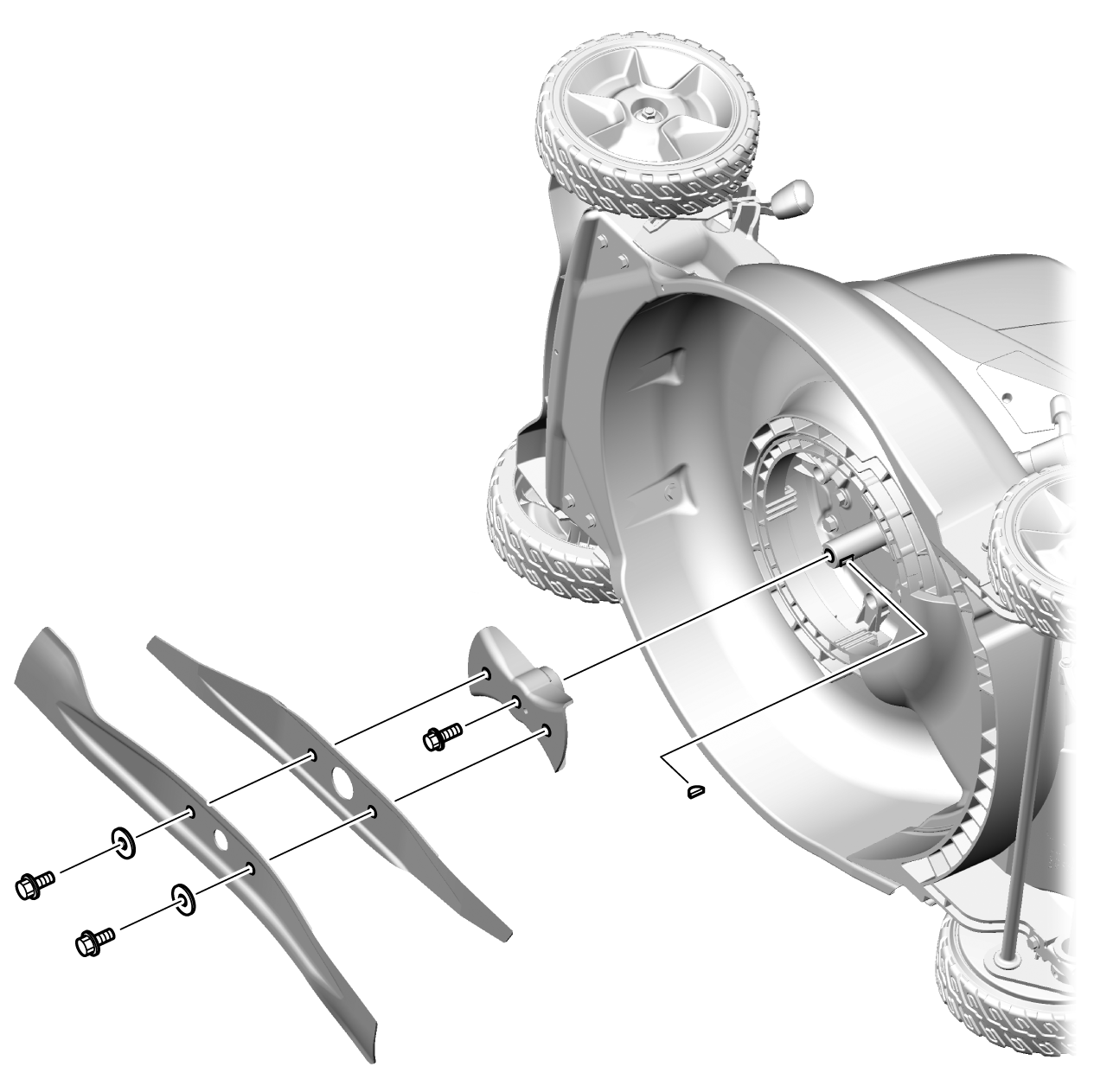
Twin Blades Removal Steps
- Remove the battery completely to prevent accidental start-up.
- Label the twin blades using masking tape or a marker to note the blade orientation before removal.
- Wear heavy gloves to hold the blades or use a wooden block to keep the blades from spinning while loosening.
- Loosen two of three bolts with a socket wrench to carefully remove the mounting bolt. Turn counterclockwise. Ensure that you do not remove the blade holder bolt or the center bolt.
- Remove the twin blades and clean off any grass or dirt using a wire brush or putty knife.
Your Best Options: Replace or Ask a Dealer
Some homeowners like to handle all aspects of maintenance, while others prefer to leave the work to a Honda professional.
Replacing the Twin Blades
Replacing the twin blades is often safer, faster, and more cost-effective than having a dealer sharpening it. Use only Honda genuine and precision-crafted twin blades and blade bolts for the best fit and safety. Honda twin blades are available through your dealer. Find the dealer closest to you.
Let a Dealer Handle Sharpening
The cutting edge on both sides of the blade should be evenly sharpened. Improper sharpening can cause dangerous vibration or blade failure. You can rely on Honda dealers to have the time, tools, and training to sharpen blades while maintaining proper balance and angle.
Importance of Blade Balance
Why does blade balance matter? Unbalanced blades can cause vibration and excessive wear on mower parts, including deck damage, engine/motor wear, and uneven cutting. Balance is not easily done without the proper tools. Replacing with OEM parts ensures correct balance out of the box.
How to Correctly Install the Blades Safely
Once you’ve cleaned and sharpened the blades, it’s time to replace them. Correctly reinstalling your lawn mower blades can be done in a few easy steps.
Clean the Mower Deck
While the twin blades are removed, take some time to clean the underside of the mower deck to remove grass buildup and other debris. Use a bristled brush or damp ramp to clean the mower deck. Before installing the blades, clean the blade holder mounting surfaces with a wire brush or shop rag. This will ensure the twin blades rest firmly and evenly on the blade holder.
Correct Installation
Use the correct blade orientation. Refer to the markings and ensure the cutting edge faces the direction of rotation by referencing the labeled side or original position.
Tighten the blade bolts to the torque specification provided in your owner’s manual using a torque wrench. Do not over-tighten or under-tighten. If you do not have a torque wrench, or do not feel comfortable tightening the blots, contact your local Honda dealer.
Reinstall Battery
For battery-powered lawn mowers, only reconnect the battery once the blades are fully secured and the mower is upright.
Ways to Keep Your Blades in Good Condition
Keeping your blades in good condition is the most important way to ensure the longevity of your lawn mower and maintain a lush and healthy lawn. Here are a few tips to do just that.
Proper Storage
Store the mower in a dry and sheltered area to prevent rust and corrosion.
Avoid Wet or Rocky Lawns
Wet grass clumps and can lead to faster blade dulling. Rocks and debris can chip or bend the blades.
Routine Inspection
Check the blades before every use for sharpness, chips, or cracks.
Replace Blade When Needed
If the blade is deeply nicked, bent, corroded, or worn thin, it’s safer to replace it with Honda genuine parts than to sharpen it. Keep in mind that sharpening is not a fix for structural issues. For that, you’ll need to contact your local Honda Power Equipment dealer.
Learn More About Our Battery-Powered Lawn Mowers
Are you ready to explore additional resources to learn more about Honda’s line of efficient, reliable, and eco-friendly battery-powered lawn mowers?
Check out our battery-powered lawn mowers product page for specs, review, and FAQs. Sign up for more information about Honda battery-powered lawn mowers.